People & Services became a CRM of your memory
This guide is for the CleverNote: Notes & Reminders app. Explore the other blog
The People & Services screen always gathered who and what your memory knows: people, providers and companies extracted automatically from your notes. But it was a read-only directory. You looked, you did not act.
Now it acts. People & Services became a real CRM, built on what sets CleverNote apart: the memory of your relationship with each contact, tying money, context and history together in one place.
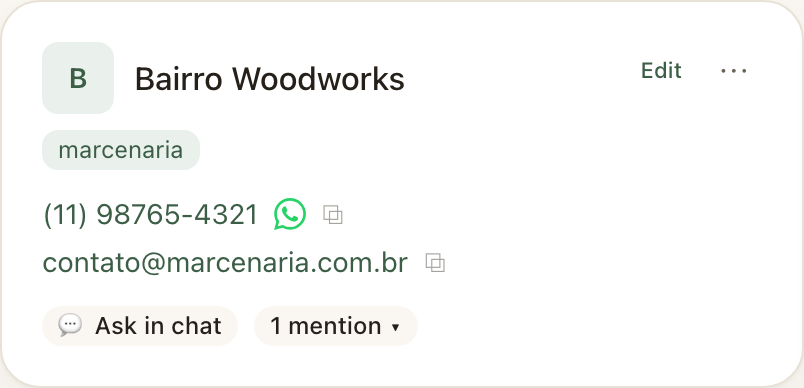
A card that does, not just shows
Each contact is now a tool. Phone, email and address became one-tap actions:
- Phone: calls directly, or opens WhatsApp for that number.
- Email: opens your email app already addressed.
- Address: opens it on the map.
And there is an “Ask in chat about {name}” button: it takes your question to the chat already focused on that person or company, without you typing the name. CleverNote infers the entity and answers from their notes only.
Taming a big list
When you have dozens of contacts, finding the right one matters. The screen gained:
- Filter by type: people, providers or companies.
- Sorting: by name, by who you mentioned most recently, or by who is mentioned most.
- Pin to top: the contacts that matter stay within reach.
- Archive: the noise (a store mentioned once in an email) leaves the main list without losing the data. It stays in search and finances, and you unarchive whenever you want.
Nothing disappears automatically. Complete memory is the point, and you decide what to hide.
Search by meaning, not just by name
The search bar no longer looks only for exact text. It combines two things at once: instant matching in the list you already see, plus a semantic search by CleverNote. You type “I need an electrician” or “contacts in Calgary” and it brings who fits, even if the exact word is not in the name.
A person’s facts, ready and fixable
The biggest leap: each contact’s facts are no longer scattered note by note. CleverNote synthesizes a summary (the plumber’s rate, someone’s birthday, a subscription renewal, a family relationship) and each fact becomes a line you can:
- Add by hand, when you know something the notes did not capture.
- Fix in one sentence: type “his rate is 180” and the fact adjusts.
- Remove, when it no longer makes sense.
And most importantly: what is yours stays locked. The CleverNote re-synthesis never overwrites a fact you added or fixed. This is the same trust principle as the rest of CleverNote: the AI-derived data is a starting point, your correction is the truth.
Who knows whom
When your notes say Natalia is your partner or that someone works at a company, CleverNote records those relationships as clickable connections between cards. It is the beginning of a graph of your world: referrals, family, vendors tied to companies.
Tasks and the last time you talked
Each contact shows the tasks tied to it (“call the plumber”) and when the last interaction was. The relationship history stops being a manual search and becomes part of the card.
The app warns you ahead of time
The novelty no ordinary contact manager does from your notes and emails: CleverNote looks at the dates it extracted (a subscription that renews on the 28th, a birthday) and warns you ahead, in your timezone. You do not have to remember to remember.
Why this matters
A traditional CRM is an address book you fill in. CleverNote does the opposite: it already knows, because it read your notes, receipts and emails. People & Services brings into one screen how much you spent with someone, what you agreed on, who referred whom and what is coming up. Relationship memory, correctable and yours.
See also: Entity extraction, Questions about specific people, Semantic search, Fix the AI in one sentence
Frequently asked questions
- If I fix a fact by hand, does the AI overwrite it later?
- No. Anything you add or fix is locked: the AI re-synthesis never overwrites what is yours. You are in charge of your memory.
- Does archiving a contact delete it?
- No. Archiving only hides it from the main list. The contact stays in search, finances and chat, and you can unarchive anytime. Nothing disappears on its own.
- Are renewal and birthday alerts on the free plan?
- Reading and manually curating contacts are free. The automatic AI summary and the proactive alerts (renewals, birthdays) are part of the paid plan.
Try the app from this guide with your CleverNote account.
Open CleverNote: Notes & Reminders
CleverNote: Notes & Reminders