
Semantic search: find notes by meaning, not by keyword
This guide is for the CleverNote: Notes & Reminders app. Explore the other blog
The limitation of keyword search
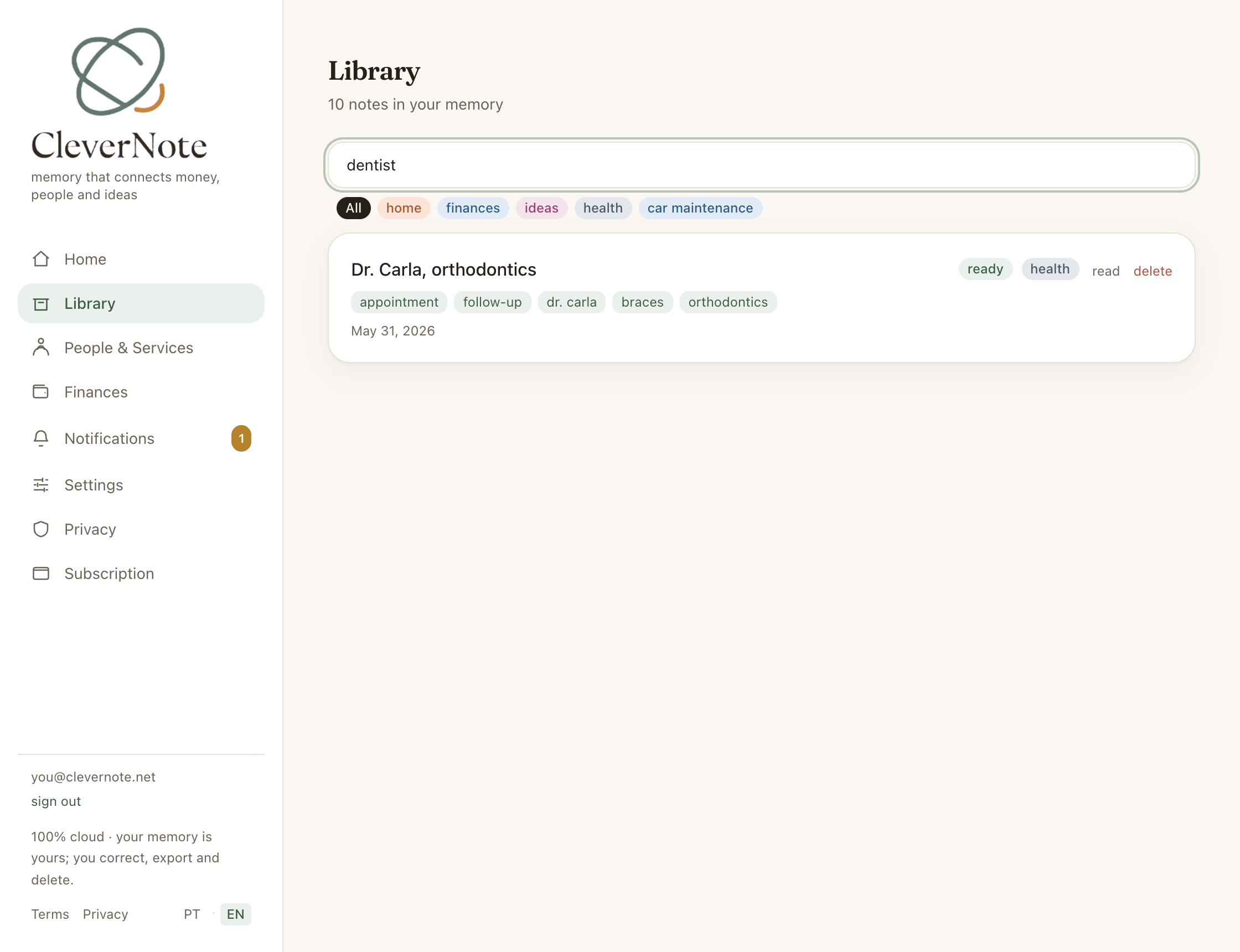
Keyword search fails in a very common scenario: when you don’t remember the exact words. You know you noted something about “that dentist someone recommended,” but the note says “Dr. Carol, orthodontics, recommendation from Mary.” Without “dentist” in the text, search won’t find it.
Semantic search solves this by comparing meanings, not strings. You type “dentist” and find the note about “orthodontics” because the model understands they’re related.
How it works technically
When you save a note, CleverNote passes the text through OpenAI’s text-embedding-3-small model. This model transforms the text into a vector of 1,536 numbers, a mathematical representation of meaning.
These vectors are stored in a database table with the pgvector extension, using an HNSW (Hierarchical Navigable Small World) index. HNSW is particularly efficient for approximate nearest-neighbor searches, exactly what we need.
When you search, your query text goes through the same embedding model. The system calculates cosine similarity between the query vector and all vectors in your archive, returning the closest ones. Everything happens in milliseconds.
How to use it in the Archive
There’s no mode to pick and no button to press. The Archive has a single search field:
- Open the Archive (note list)
- Start typing in the search field
- As you type, CleverNote runs two searches at once: keyword (instant, over the notes already loaded) and semantic (by meaning, across your whole archive)
- Results show up together, with keyword matches first and the meaning-only matches right below them
You don’t have to decide which to use: the system combines both automatically and shows both result sets in the same list. It works the same on web and in the app.
Examples of what semantic search finds
| You type | Finds note that says |
|---|---|
| dentist | ”orthodontics appointment, Dr. Carol” |
| plumbing problem | ”plumber came to fix leak” |
| important meeting | ”alignment call with the team” |
| cake recipe | ”preparation method, mix flour and eggs” |
| transportation expense | ”Uber, $24.50, airport” |
| car insurance | ”policy renewal, vehicle, coverage period” |
What each approach brings
Since the field combines both, it helps to understand what each one contributes to the results:
The keyword part shines when:
- You remember part of the exact title or text
- You’re looking for a specific person or company name
- You need exact matching (ID numbers, invoice codes)
The semantic part shines when:
- You remember the context but not the exact words
- You want to find notes related to a theme
- You’re exploring what you’ve noted about a subject
The difference from chat searches
Semantic search in the Archive is for visual navigation of your notes. Chat does something more powerful: it uses semantic search behind the scenes, and combines information from notes, people and reminders, and responds in natural language with citations. Ask, for example, “what did the doctor recommend at my last appointment?”. To consolidate spending, use Finance chat.
See also: Chat with citations, Related notes, Entity-scoped chat
Frequently asked questions
- Is semantic search slower than keyword search?
- Not noticeably. Vector search in CleverNote uses an HNSW index in pgvector, optimized for millisecond responses even with thousands of notes.
- Do I need to do anything special to enable semantic search?
- No. All captured content automatically gets embeddings, and there's nothing to switch on. The Archive has a single search field: as you type, it combines keyword search and meaning-based search at the same time.
- Does semantic search work across languages?
- Partially. The embedding model has some multilingual capability, but results are more precise when the search and notes are in the same language.
Try the app from this guide with your CleverNote account.
Open CleverNote: Notes & Reminders
CleverNote: Notes & Reminders
