
Ask questions about specific people and service providers
This guide is for the CleverNote: Notes & Reminders app. Explore the other blog
The problem of remembering people
You thought of consulting a specialist someone recommended months ago, but you don’t remember the name. You only know it was “that tax attorney that Fernando knew.” With keyword search, you probably won’t find it.
With CleverNote’s entity-scoped chat, you type exactly that, and the system figures out who you mean.
How entity inference works
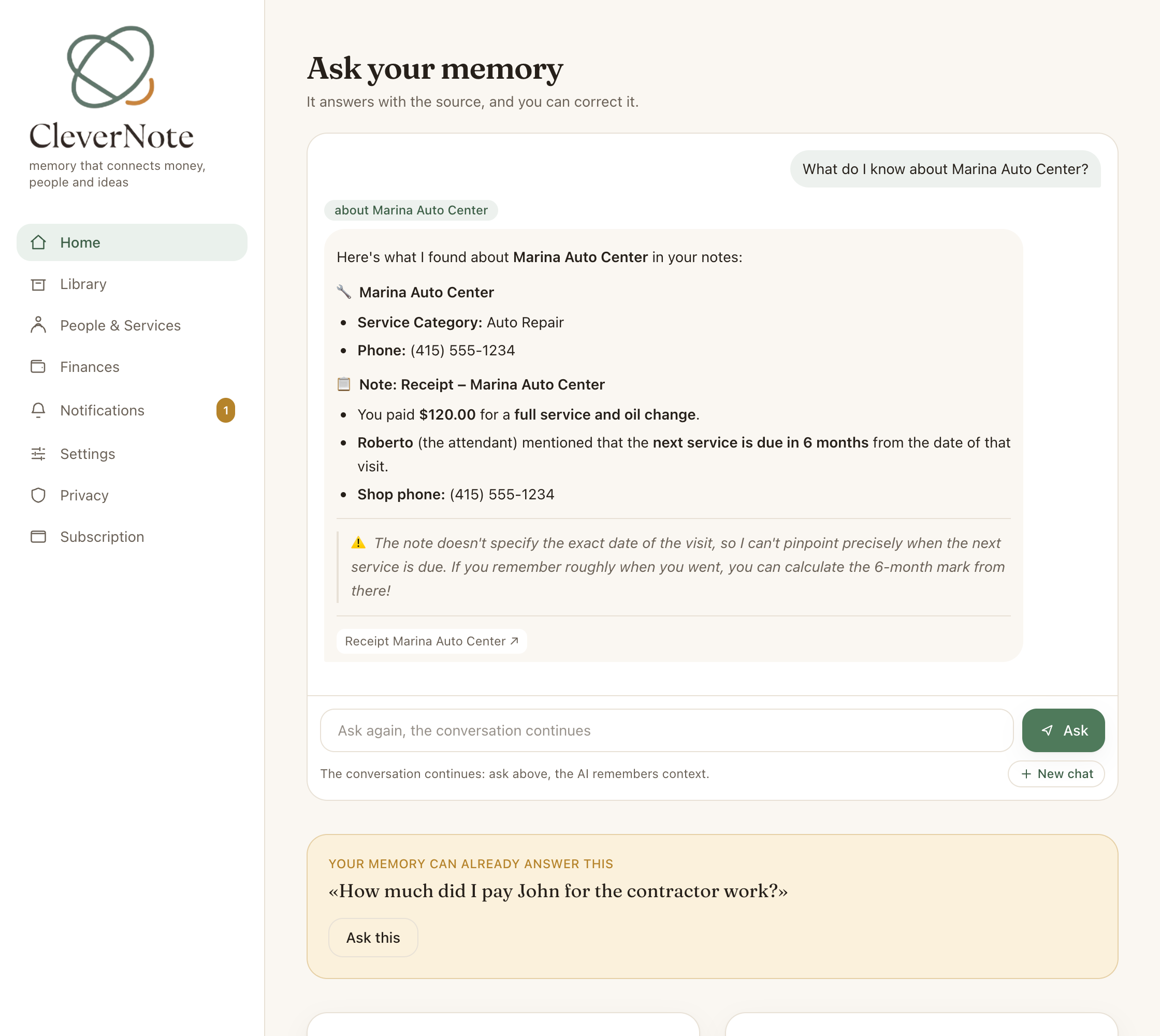
When you ask a question that seems to be about a specific person or company, CleverNote:
- Identifies that the question has an entity anchor (“the dentist,” “the IT supplier”)
- Matches your description (nickname, relationship, service category) to the right entity in your archive
- Filters notes to include only those that mention that entity
- Responds based on that focused subset
This focus dramatically improves response quality. Without entity filtering, CleverNote would have to sift through all your notes. With the filter, it concentrates attention on what’s truly relevant.
Example questions by entity
"What's the contact for the architect who did my apartment redesign?"
→ Infers the entity, returns name, phone, email, address if available

"What did the physical therapy clinic recommend last time?"
→ Finds the recommendations in the note associated with the clinic

"What did the nutritionist ask me to do?"
→ Searches notes about the nutritionist entity and lists the instructions

"When was the last time I called my accountant?"
→ Finds the most recent note mentioning the accountant and the date

"Who referred the lawyer?"
→ Searches the referral context in the note where the lawyer appears
No need to open the entity profile
In the app, there’s an entity profile screen with complete history. But for quick lookups you don’t need to navigate there. Just ask in chat and CleverNote brings the relevant information directly.
How the entity chip appears
When CleverNote identifies an entity in your question, the response may include a chip with the entity’s name. The chip shows the focus of the search, making it clear who CleverNote answered about. The cited notes below the answer are clickable: tapping one opens the source note so you can check the full context.
Tip: relationship questions
Entity chat is especially useful for relationship questions:
"Who referred Dr. Roberts to me?"
"Which service providers have you found in the downtown area?"
"Who did I used to work with at Company X?"
These questions would be hard to answer with keyword search, but CleverNote can because it extracted the context from your notes when they were captured.
See also: Entity extraction, Chat with citations, Semantic search
Frequently asked questions
- Do I need to type the exact person's name?
- No. You can describe by context, 'the dentist they recommended' or 'the plumber who came in March', and CleverNote infers who you mean.
- What appears when I ask about a person?
- CleverNote searches only the notes that mention that entity, returning contact information, interaction history and information from associated notes.
- What if I have two contacts with the same name?
- The system uses additional context (category, company, date) to distinguish them. If ambiguous, the response indicates both possibilities.
Try the app from this guide with your CleverNote account.
Open CleverNote: Notes & Reminders
CleverNote: Notes & Reminders
