
Related notes: connections you didn't know you had
This guide is for the CleverNote: Notes & Reminders app. Explore the other blog
Memory that connects what you wouldn’t connect
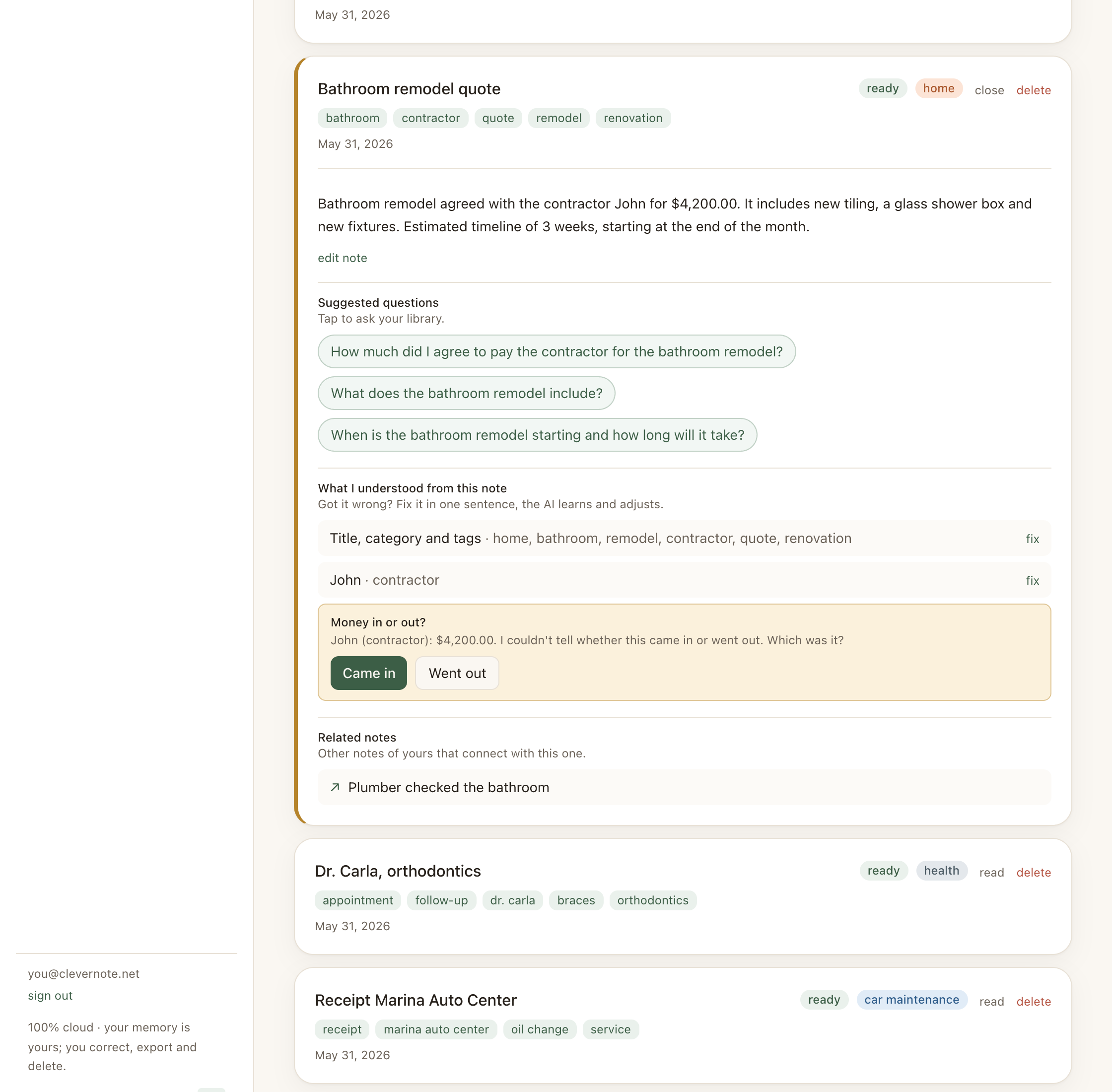
You’re reading the note about your bathroom renovation budget. In the related notes, a conversation appears from months ago where you mentioned the plumber gave a preliminary assessment of the same work. You had completely forgotten.
That’s the value of related notes: bringing relevant context you wouldn’t know to search for because you didn’t know it existed.
How the system finds relations
CleverNote uses a two-stage hybrid approach:
Stage 1, Shared entities (primary recall): the system looks for other notes that mention the same person, company or place as the current note. Candidates are ranked by how many entities they share (the more in common, the more related).
Stage 2, Vector similarity (fallback): when the current note shares no entity with any other note, the system falls back to embeddings: it compares the meaning of the current note against your archive and brings back the closest ones in vector space.
In both stages, an LLM judge always filters out false positives. It cuts notes that only share something generic (the same city, the same category, the same format) but don’t truly connect.
The result is a list of up to 5 related notes, shown at the bottom of the opened note (web and mobile). There may be fewer than five, or none, when the system finds no confident match.
Where related notes appear
In a note’s detail view, below the content (on both web and mobile), the Related notes section appears. Each card shows only the related note’s title.
Clicking the card opens the related note, where you’ll see other notes related to it, chained memory navigation.
Cases where related notes shine
Before a meeting with a client: open the most recent note about them and related notes will bring the history of interactions, quotes and pending items.
During research: when capturing a new article on a topic, related notes show what you already had noted, avoiding duplication and creating connection.
In financial review: when seeing a large expense, related notes can bring the context that explains that cost (the meeting note where the service was contracted, for example).
When revisiting an old idea: you return to a note with an idea and related notes show the subsequent development or information that confirms or refutes the idea.
The difference from semantic search
Semantic search = you have a question and search for it.
Related notes = you’re reading a note and the system brings context you didn’t ask for but that’s relevant.
Semantic search is active (you search). Related notes are passive (the system suggests). Semantic search runs on embeddings; related notes start from shared entities and only fall back to embeddings when there’s no shared entity.
See also: Semantic search, Chat with citations, Note summary and suggested questions
Frequently asked questions
- How does CleverNote decide which notes are related?
- First by shared entities: notes that mention the same person, company or place, ranked by how many entities they share. When a note shares no entity at all, the system falls back to embedding (vector) similarity. In both cases, an LLM judge filters out false positives (notes that only share a city, category or format).
- Can notes from any date appear as related?
- Yes. There's no age limit. A note from two years ago may be the most relevant to what you're reading now.
- Can I disable related notes?
- There's no option to disable, but you can ignore the section. It doesn't interfere with the main note's content.
Try the app from this guide with your CleverNote account.
Open CleverNote: Notes & Reminders
CleverNote: Notes & Reminders
