
TL;DR and suggested questions: summarize and explore your notes with AI
This guide is for the CleverNote: Notes & Reminders app. Explore the other blog
The problem with long notes
You captured a one-hour meeting transcript, a long article or a PDF contract. Weeks later, you need to remember the key point. Re-reading everything isn’t practical.
CleverNote’s TL;DR solves this: a 1-3 sentence summary that captures what matters, generated automatically by CleverNote.
What is TL;DR
TL;DR stands for “Too Long; Didn’t Read”, internet jargon for “summary of what’s long.” In CleverNote, it’s a concise summary that CleverNote generates and shows at the top of a note.
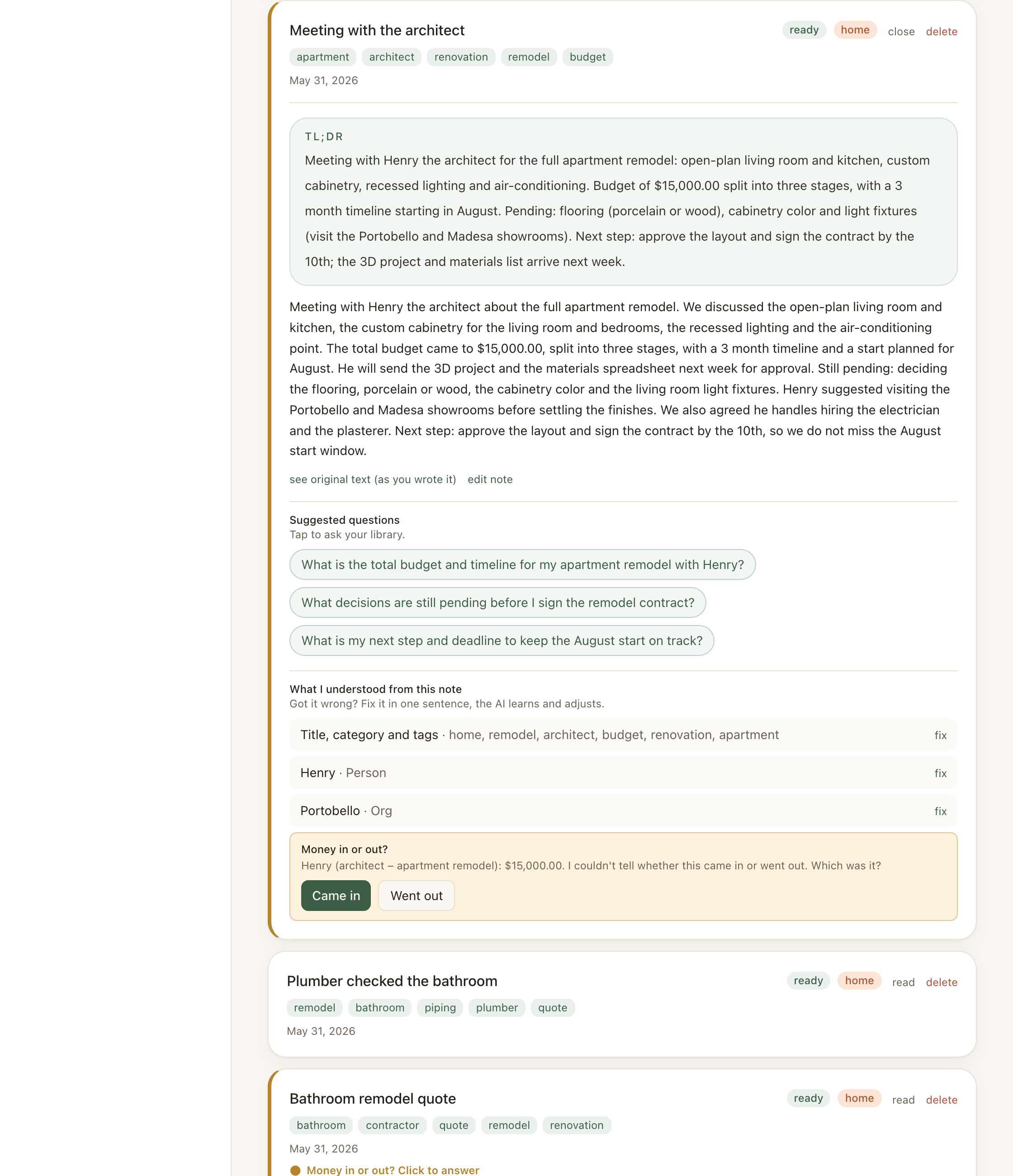
For a 500-word meeting note, the TL;DR might be:
“Meeting with architect to discuss apartment renovation. Budget of $45,000, 3-month timeline, starting in August. Pending: floor plan approval.”
For an article on productivity saved with the web clipper:
“Pomodoro technique: 25 minutes of focus + 5-minute break. Effective for tasks requiring prolonged concentration. Recommended to combine with a daily task list.”
How it’s generated
TL;DR is generated the first time you open the note after enrichment. Once generated, it’s cached, you don’t pay for the same processing every time.
For notes that have been significantly edited, the cache is invalidated and a new TL;DR is generated on the next access.
Suggested questions
Along with the TL;DR, CleverNote generates 2-3 questions you’re likely to want to ask about that note. Questions appear as clickable chips below the TL;DR.
Clicking a question automatically sends it to chat with the note as priority context. You get an immediate answer without typing.
Example generated questions:
For a quote note:
- “What are the payment terms and timeline?”
- “Does the quote include materials or labor only?”
- “What are the highest-cost line items?”
For a medical appointment note:
- “What tests were requested?”
- “What’s the next recommended appointment?”
- “What medications were prescribed?”
For a business idea note:
- “Who is the described target audience?”
- “What risks are mentioned?”
- “Is there a next step indicated?”
Why this matters
TL;DR and suggested questions transform usage patterns. Instead of capturing and never reviewing, you capture and have an immediate entry point to any note. The long note stops being a dead file and becomes a conversation.
For heavy capturers (transcripts, articles, PDFs, meetings), TL;DR is the feature that makes the archive truly usable day-to-day.
See also: Chat with citations, Related notes, Semantic search
Frequently asked questions
- Is TL;DR generated for all notes?
- For short notes (less than about 600 characters), TL;DR is not generated: the content is already short enough to read directly. For longer notes, it's generated the first time you open the note.
- Are suggested questions generic?
- No. Questions are specific to the note's content. For a renovation budget note, questions might be 'What's the total amount?' and 'What's the estimated timeline?'
- Can I edit the TL;DR?
- CleverNote generates the TL;DR and it's not directly editable. If imprecise, you can correct the note's content and the TL;DR will be regenerated.
Try the app from this guide with your CleverNote account.
Open CleverNote: Notes & Reminders
CleverNote: Notes & Reminders
