
Correct AI in one sentence and it learns
This guide applies to both CleverNote Finance and CleverNote: Notes & Reminders. Explore the other blog
Choose the correction context
In Notes, review text, people and reminders. In Finance, check amounts, categories and transactions. A source note can be consulted from either product; correcting that source does not add a finance dashboard to Notes.
AI that makes mistakes isn’t the problem. AI that doesn’t learn is.
Every AI makes extraction mistakes. The merchant was misread, the category is imprecise, the amount was in another column. This is expected and acceptable.
The real problem is when correcting requires going to a form, finding the right field, saving. You end up not correcting and letting wrong data accumulate.
In CleverNote, correction happens in natural language, in the same interface where you already are.
How it works in practice
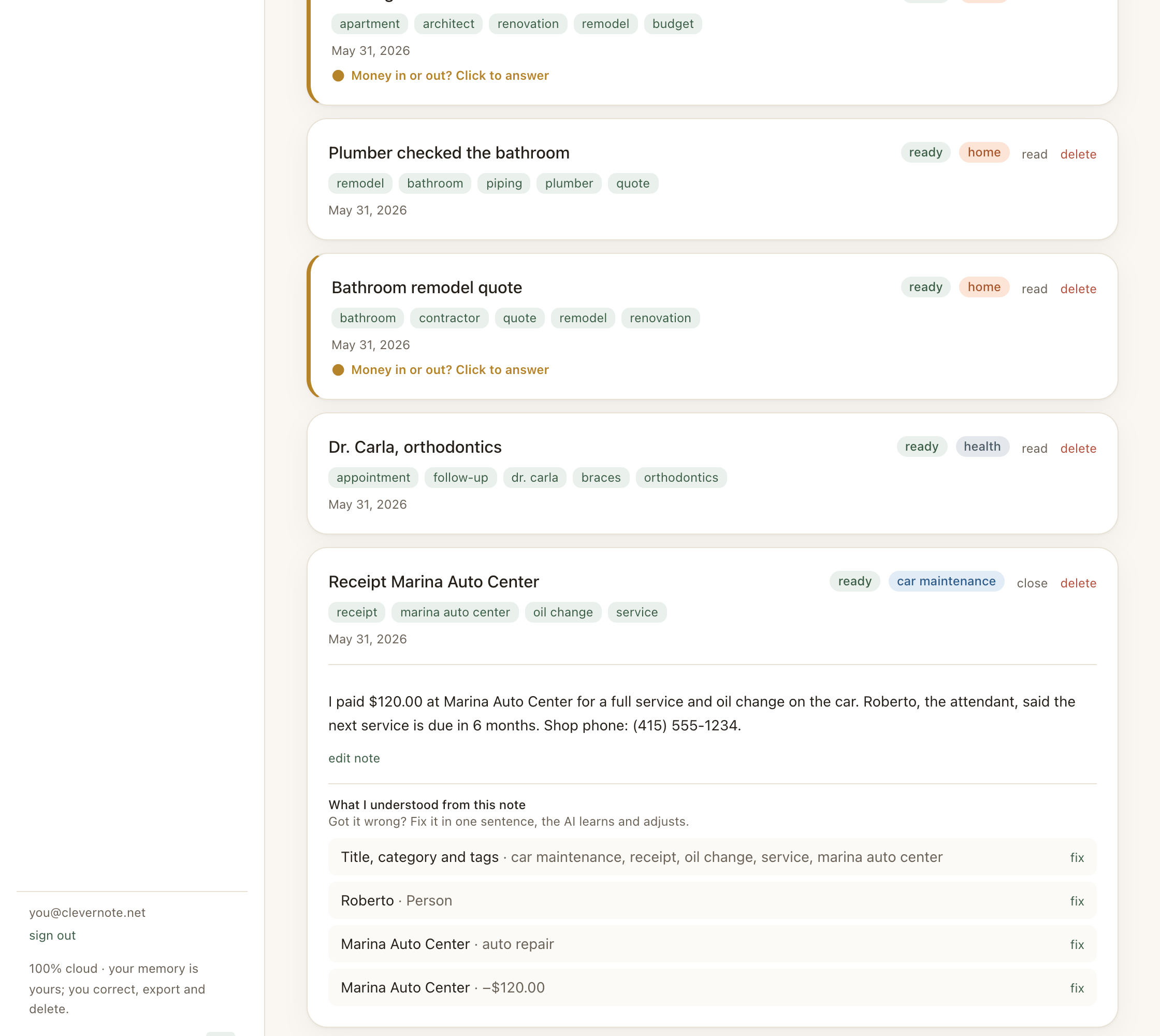
In any note, below the content there’s an Extractions section that shows what the AI derived: expenses, entities, reminders, classification.
To correct anything, use the note’s text box with a simple phrase:
"the correct amount is $47.80"
"the merchant is CVS, not Walgreens"
"the appointment date is June 20th, not the 15th"
"the plumber's name is Mark Turner"
"this expense is income, not an expense"
"remove this duplicate expense"
"the correct category is Healthcare, not Services"
CleverNote interprets the instruction, identifies the field to correct and applies the change. You see confirmation of what was changed.
What can be corrected
| Field | Correction example |
|---|---|
| Note title | ”the correct title is ‘Kitchen quote‘“ |
| Category | ”classify as Work, not Personal” |
| Tags | ”add the tag ‘urgent‘“ |
| Expense amount | ”the amount is $130, not $103” |
| Direction | ”this entry is income, not expense” |
| Entity name | ”the doctor is Dr. Roberts, not Dr. Rodgers” |
| Entity phone | ”the correct phone is (555) 987-6543” |
| Reminder date | ”the deadline is August 30th” |
| Deletion | ”remove this expense, it’s a duplicate” |
How learning works
Each correction you make is recorded as an example: “in this context, extraction X was wrong and the correct answer is Y.” Your most recent corrections become examples that the system reuses when processing your next notes, so it avoids repeating the same mistakes.
In practice, this helps CleverNote get your specifics right: the abbreviated name of your doctor, the category you use for business travel, the merchant CleverNote confuses with another.
Nothing from the original is lost
The note’s original text is always saved in versions: the history keeps what you wrote (original) and the version with the AI’s grammar polish. You can reach it from the note’s menu.
Each field correction, in turn, records the before and after of what changed (expense, category, entity). That record is the correction’s audit trail, not a “version” of the note.
So you never lose the original information, and it stays clear what each correction changed.
See also: Entity extraction, Receipt photos, Finance dashboard
Frequently asked questions
- Does the correction apply to all notes or just the current one?
- The correction is applied to the current note. The system uses the correction as a learning signal for similar contexts in the future.
- Can I undo a correction?
- Yes. The version history keeps the note's original text, and each field correction records the before and after of what changed.
- What can I correct beyond amounts?
- You can correct title, category, tags, date, entity (name, contact), amount, direction (expense/income) and even delete an incorrect extraction.
Try the app from this guide with your CleverNote account.
Open CleverNote FinanceOpen CleverNote: Notes & Reminders
CleverNote Finance


CleverNote: Notes & Reminders