
AI-generated financial plans and budgets in CleverNote Finance
This guide is for CleverNote Finance: transactions, budgets and goals. Explore the other blog
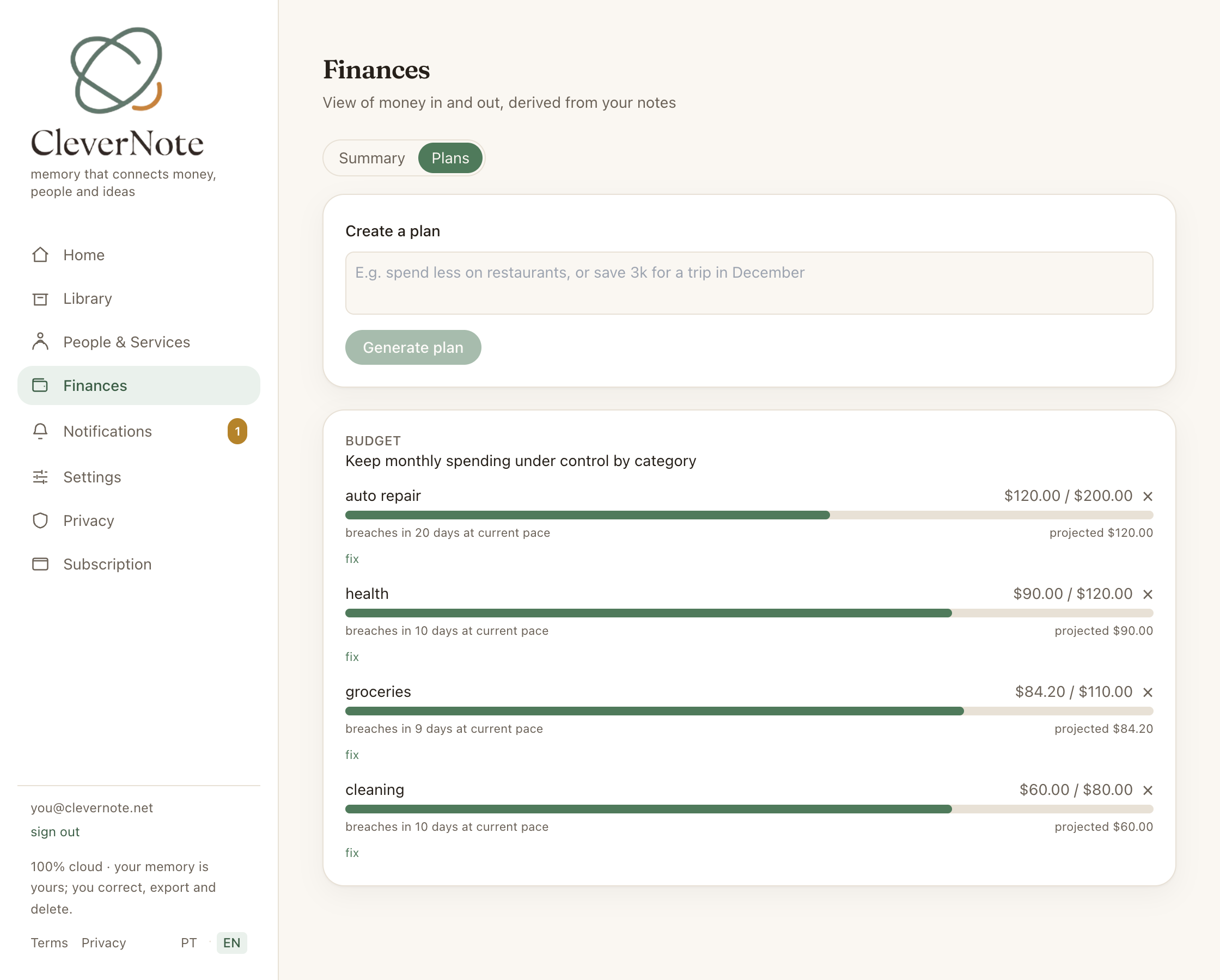
Beyond tracking: active planning
Tracking expenses is the foundation. But knowing what you spent in the past doesn’t prevent you from repeating the same pattern in the future. Active planning, setting category limits and savings goals, is what transforms data into behavioral change.
CleverNote Finance creates these plans with AI, based on your real history, not generic templates.
Two types of plans
Monthly budget by category
A budget sets a spending limit per category for the month. CleverNote Finance proposes amounts based on your historical average, adjusted for your stated intentions.
For example, if you’ve averaged $800/month on food over the last 6 months, CleverNote Finance might propose a budget of $720 (10% reduction). You can accept, adjust or propose a different amount.
The budget renews automatically each month. The previous month’s limit doesn’t “carry over” to the next.
Financial goal
A goal has:
- Objective: “Emergency fund of $15,000”
- Deadline (optional): “in 18 months”
CleverNote Finance monitors registered contributions and shows progress (saved so far versus target) and a projected completion month, computed from the pace of the contributions you’ve already made.
How to create a plan
- In the finance dashboard, access the Plans section
- Click New plan
- Describe your intention: “I want to control food spending” or “I want to save $10,000 in 12 months”
- CleverNote Finance proposes parameters based on your history
- You review, adjust and confirm
No plan is activated without explicit confirmation.
Deviation alerts
When a budget is about to be exceeded, you receive a notification:
- 80% consumed: amber alert: “You’ve already spent 80% of your Food budget”
- 100% consumed: red alert: “Food budget exceeded”
- Projected overage: predictive alert: “At your current pace, you’ll exceed your Services budget before month end”
Alerts appear in your in-app notifications (and in the email digest), and on iPhone they also arrive via push.
Correcting limits via chat
You can adjust plans in natural language:
"Increase the food limit to $900 this month"
"Remove the entertainment cap, I don't want a limit there"
"Change the emergency goal deadline to 24 months"
CleverNote Finance interprets it, makes the correction and confirms what changed.
Available on paid plan
Financial plans is a feature exclusive to the paid plan. On the free plan, you can view previously created plans (read-only mode), but cannot create new ones or edit existing ones.
See also: Finance dashboard, Bank statement processing, Free vs paid plan
Frequently asked questions
- Does CleverNote Finance create the budget on its own?
- It proposes a budget based on your history. You review and confirm before activating. Nothing is created without your explicit approval.
- Can I have a budget in a different currency than my primary one?
- Yes. CleverNote Finance uses the currency that makes the most sense based on your intent. You can adjust in the plan's settings.
- What is a goal plan?
- A goal has a target amount and an optional deadline. CleverNote Finance tracks progress (how much you've already contributed) and projects the completion month based on the pace of your contributions.
Try the app from this guide with your CleverNote account.
Open CleverNote Finance
CleverNote Finance
