
You already capture in CleverNote your own way: a receipt screenshot, an audio note on the go, a PDF of a statement, a quick typed note. The system reads it, understands it and organizes it. Now that same capture yields three new extractions, with no configuration and no change to how you write.
These are three things that used to live only in separate, single-channel apps. Here they come out of your multimodal memory, linked to everything else, and fixable in one sentence.
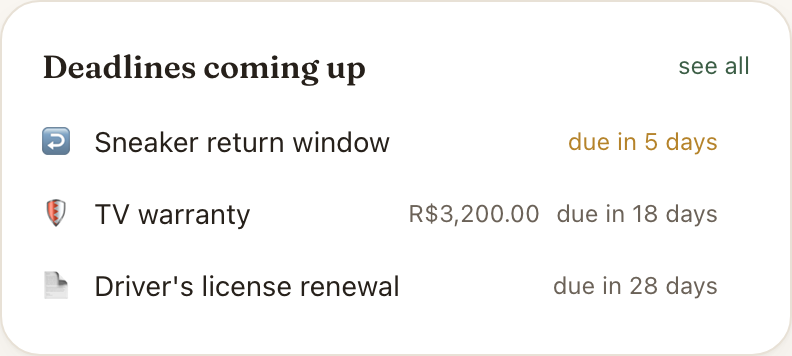
Deadlines that do not come back
The fridge warranty. The return window on the shoes. The free trial that becomes a charge in a week. The passport about to expire. The “cancel by the 20th or it renews for another year.” They all share one thing: they are deadlines with a consequence of LOSS. If you do not act in time, you lose money or you lose a right.
Take the photo of the receipt. Beyond logging the expense, CleverNote now derives the deadline. “12-month warranty” plus the purchase date become the exact date the warranty ends. On Home you get a “Deadlines coming up” card, and near the due date a heads-up arrives (on the paid plan) before it lapses.
This is not an ordinary reminder. “Pay the bill on the 10th” is a reminder: you act by paying. A warranty is different: it expires on its own, and you only find out you lost it when you need it. That is why it is its own list. And, again, we only create the deadline when it is clear in the text, never on a hunch.
Who owes what
“Told Ana I would send the quote on Friday.” “The painter said he would get back to me with the price.” “The client was going to approve by Thursday.” These are promises, and they have two sides: either you owe someone, or someone owes you.
CleverNote now keeps these open loops anchored to the contact. Open the person in People & Services and you will see a “Pending” block: what you owe them (an up arrow) and what they owe you (a down arrow). When you settle it, one tap marks it done and it leaves the list.
When there is a date, a heads-up (paid) nudges both directions: “you were going to send Ana the quote today” and “the painter was going to get back to you with the price.” The question that keeps adults up at night, “what did I forget to reply to or to chase?”, stops living only in your head and gets a home.
Numbers that become a chart
“Weighed 81kg.” “Ran 5k.” “Mood 6 out of 10.” “Slept 6 hours.” “Blood pressure 130 over 85.” Write the number the way you would in any note, in the middle of a sentence. When you log the same measure at least three times, a curve shows up in the new Metrics tab. No spreadsheet, no health app, no setup.
The trick is CleverNote understanding that “weight”, “weighed” and “peso” are the same quantity and grouping them into one series instead of scattering them across three lists. A number that is money stays an expense, not a metric. And health data is flagged as sensitive.
This is the kind of thing that today only exists if you build your own spreadsheet: Apple Health refuses free text, and no notes app detects a repeated number and draws the curve. Here you just write it.
As always: it is yours, and fixable in one sentence
All three extractions follow the principle that defines CleverNote: the AI suggests, you decide. Got a weight wrong? Write “that weight was 81, not 18” in the note detail and it is fixed. More than that: the correction teaches the future, so the same mistake tends not to come back. Every deadline, every pending item and every measurement points back to the note that produced it, and nothing disappears on its own.
Reading all of this is free. The proactive nudges, the deadlines coming up, the chases and the trends worth a push, are part of the paid plan. The rest you check whenever you want.
See also: Reminder extraction, Time-series metrics, Recurring events
Frequently asked questions
- What is the difference between a deadline and a reminder?
- A reminder is when YOU do something at a time (pay a bill, go to a meeting). A deadline is when something EXPIRES if you do not act, and you lose money or a right (a warranty, a return window, the end of a free trial). They are two separate lists, because they are two different things.
- Does CleverNote make up deadlines?
- No. We only create a deadline when it is explicit or strong in the text: the printed expiry, '12-month warranty', 'returns within 30 days', 'free until MM/DD'. We never guess from world knowledge ('that store usually gives 30 days'). No clear deadline, nothing is created.
- Do I have to configure which numbers become a metric?
- No. CleverNote decides on its own whether a number is a self-measurement you tend to repeat (weight, runs, mood, blood pressure). A number that is money stays in Finances. The curve only shows up after 3 entries of the same thing, to cut out the noise of a one-off number.
- Who sees my health metrics?
- Only you. Health data (weight, blood pressure, glucose, mood) is flagged as sensitive and follows the same privacy governance as the rest of your memory: exportable, deletable and isolated per account. No local models, no training on your data.
Ready to try? CleverNote is free to start, no credit card required.
Try for free